Field notes / core-developer-intent
Convert a Bank Statement PDF to JSON with Node.js
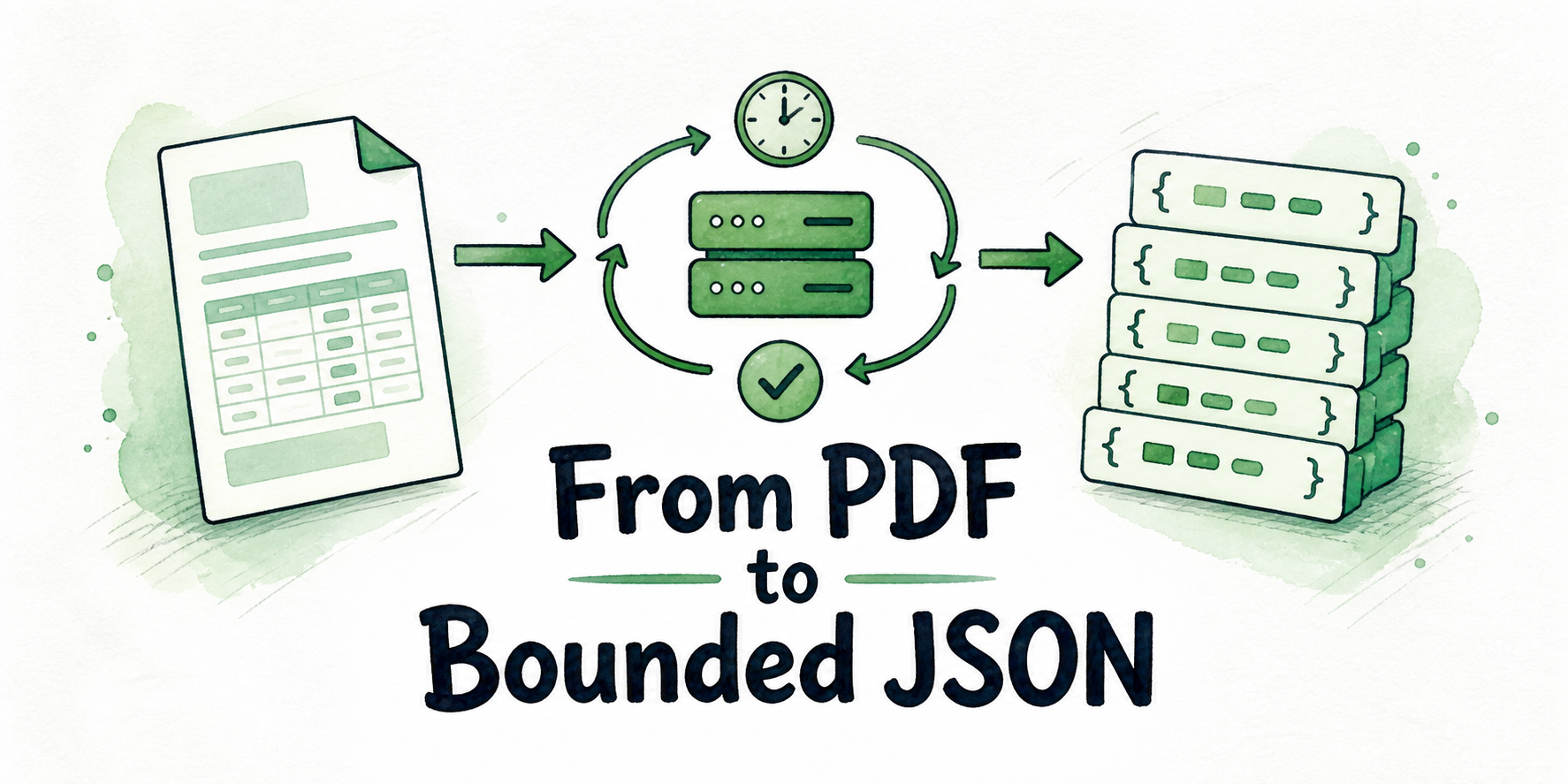
Build a bounded Node.js state machine for multipart upload, asynchronous polling, JSON validation, rate limits, and expiry handling.
2026-07-27 · 10 min read · bankstatement.ai Team
TL;DR
- Keep the bearer token in your server-side Node.js environment.
- Create an asynchronous job by sending the PDF as
multipart/form-datawithmode=convert. - Treat HTTP 202 and its job ID as acceptance, not a completed conversion.
- Poll until the job reports
completeorfailed, with a caller-defined deadline. - Handle HTTP 429 using
retryAfterSeconds; handle HTTP 402 as a request for account action, not a job state. - Retrieve the JSON transaction result after completion, then validate
date,description, andamountbefore using it. - Persist any required data before the seven-day result expiry.
The multipart request is the easy part. The costly mistake is treating its accepted response as if the JSON were ready: a robust backend must retain the job ID, wait without polling forever, distinguish retryable responses from terminal outcomes, and refuse malformed transaction rows before they enter a finance workflow.
Table of Contents
- Key Takeaways
- Prerequisites for the Node.js Flow
- Model the Workflow as a State Machine
- Submit the Synthetic PDF
- Poll with a Deadline
- Retrieve and Validate the JSON Result
- Handle Failures and Expiry
- Choose the Right Source of Detail
- Run the Flow
- FAQ
Key Takeaways
- Authentication belongs at the backend boundary. A browser or mobile client should call your server rather than receive the API token.
- An accepted upload creates an asynchronous job. Your application needs a durable association between its own request and the returned job ID.
- Job states and HTTP branches solve different problems.
completeandfaileddescribe processing; HTTP 402 and HTTP 429 tell the caller what to do about a request. - Polling needs a stopping rule chosen by your application. A local timeout does not mean the remote job failed.
- Runtime validation catches unusable shapes, not extraction mistakes. Financial output still needs an appropriate review path.
- Result availability is temporary, so downstream persistence cannot be deferred indefinitely.
Prerequisites for the Node.js Flow
Prepare these inputs before sending a request:
- A backend Node.js runtime capable of making HTTPS requests and constructing multipart bodies. Choose the specific runtime and multipart library according to your deployed environment.
- An API token loaded from a server-side secret or environment variable. Never embed it in frontend JavaScript, mobile code, logs, or a fixture.
- An authorized synthetic PDF bank statement, such as
fixtures/synthetic-checking-statement.pdf. It should contain invented account and transaction data rather than a real customer’s financial information. - A supported statement type. PDF, CSV, and XLSX inputs are supported, with a 25 MB maximum per file. This implementation stays focused on PDF. Supported file types and limit
- Local checks that the fixture exists, has the intended file type, and is within the size limit before building the request.
The bankstatement.ai REST API uses bearer authentication and advises keeping tokens server-side. Requests originating in a customer-facing application should therefore pass through your backend. Authentication guidance
Do not log the token, multipart body, or statement contents. Operational logs can still record a safe internal correlation ID, the remote job ID, transition times, attempt counts, and coarse error categories.
Model the Workflow as a State Machine
Write the transition rules before writing the request code. This keeps transport errors, account conditions, and processing outcomes from collapsing into one generic failure handler.
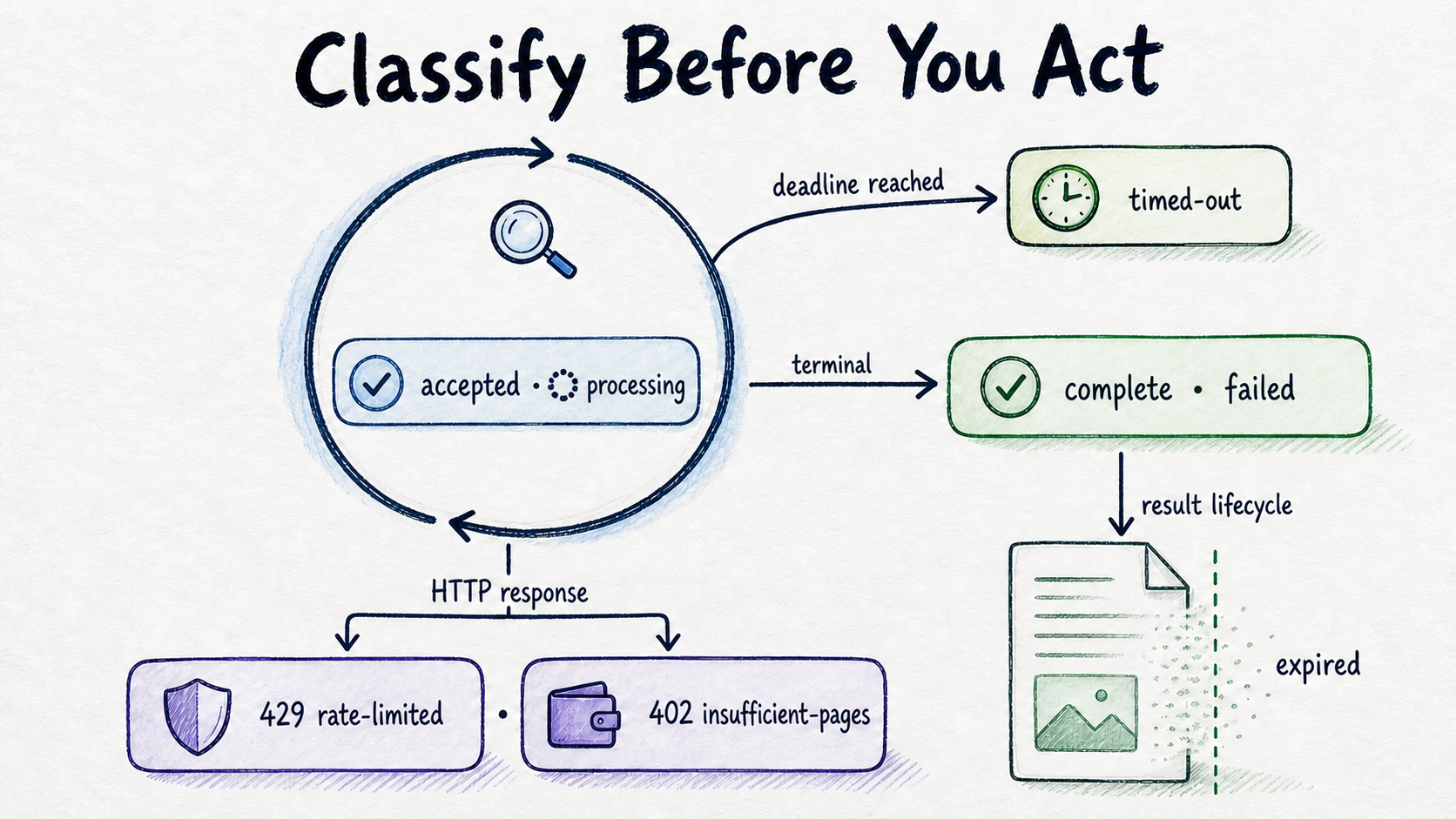
| Outcome | Classification | Backend action |
|---|---|---|
accepted |
Job lifecycle | Save the job ID and schedule the first status check. |
processing |
Job lifecycle | Continue bounded polling. |
complete |
Terminal job state | Stop polling and retrieve the JSON result. |
failed |
Terminal job state | Stop polling, record a safe failure category, and send the case to the appropriate recovery path. |
timed-out |
Local control state | Stop this polling run; do not claim the remote job failed. Reconcile its status later if appropriate. |
rate-limited |
HTTP branch | Wait for the supplied retryAfterSeconds, then retry within the existing bound. |
insufficient-pages |
HTTP branch | Stop automatic retries and require account action. |
expired |
Result lifecycle | Treat the old result as unavailable; resubmit only if processing remains authorized and necessary. |
The important distinction is that rate-limited and insufficient-pages are not persisted job statuses. The API documents HTTP 429 with retryAfterSeconds, while HTTP 402 means the account needs more pages. Operational API responses
Likewise, timed-out belongs to your application. It means the caller-defined polling budget ended without observing a terminal state. Keeping that distinction prevents a slow or interrupted status check from being recorded as an extraction failure.
Submit the Synthetic PDF
Job creation is a server-side POST to https://api.bankstatement.ai/api/v1/jobs. Send an Authorization: Bearer … header and a multipart/form-data body containing mode=convert plus the statement file. Successful creation returns HTTP 202 with a job ID. Job creation contract
Because multipart support differs among Node.js versions and HTTP libraries, keep the orchestration independent of the body-building mechanism:
async function createConvertJob({ token, syntheticPdf }) {
  const form = buildMultipartBody();
  form.addField("mode", "convert");
  form.addFile("statement", syntheticPdf);

  const response = await sendHttpRequest({
    method: "POST",
    url: "https://api.bankstatement.ai/api/v1/jobs",
    headers: {
      Authorization: `Bearer ${token}`,
      ...form.headers(),
    },
    body: form.body(),
  });

  if (response.status === 402) return { branch: "insufficient-pages" };
  if (response.status === 429) return parseRateLimitBranch(response);
  if (response.status !== 202) return classifySubmissionFailure(response);

  return parseAcceptedJob(response);
}
This is an implementation skeleton, not a substitute for the response schema. parseAcceptedJob should read the documented job ID property, verify that it is a usable non-empty identifier, and reject an unexpected envelope. Do not guess a field name and silently store undefined.
Let the HTTP library generate the multipart boundary. Manually setting a bare Content-Type: multipart/form-data can produce a header that does not match the encoded body. Also check the response status before parsing it as an accepted-job payload; an error response may have a different shape.
Poll with a Deadline
The status operation is GET /api/v1/jobs/:id, and polling continues until complete or failed. Asynchronous job polling
Use either a maximum attempt count or an absolute deadline selected for your application. The API evidence does not establish a universal interval or timeout, so the following values must come from your own configuration:
async function waitForTerminalState({ jobId, token, deadline, nextDelay }) {
  while (Date.now() < deadline) {
    let response;

    try {
      response = await getJobStatus({ jobId, token });
    } catch (error) {
      const decision = classifyNetworkError(error);
      if (decision === "stop") return { state: "timed-out", cause: "network" };
      await nextDelay({ reason: "network" });
      continue;
    }

    if (response.status === 429) {
      const retryAfterSeconds = readRetryAfterSeconds(response);
      if (!isValidDelay(retryAfterSeconds)) {
        return { state: "timed-out", cause: "invalid-rate-limit-response" };
      }
      await nextDelay({ reason: "rate-limit", retryAfterSeconds });
      continue;
    }

    if (response.status === 402) {
      return { state: "insufficient-pages" };
    }

    const job = parseJobStatus(response);
    if (job.status === "complete" || job.status === "failed") return job;

    await nextDelay({ reason: "processing" });
  }

  return { state: "timed-out", cause: "deadline" };
}
The network classifier should distinguish transient connection problems from conditions that should stop immediately, such as invalid authentication. Keep every retry inside the same deadline; otherwise repeated network errors or 429 responses can make a supposedly bounded loop run forever.
If a polling process restarts, resume from the saved job ID instead of uploading the same fixture automatically. That avoids creating duplicate jobs merely because a worker lost memory or connectivity.
Retrieve and Validate the JSON Result
Once the job is complete, use the result identifier supplied by the completed-job response and retrieve JSON through the route defined in the current API documentation. The API supports fetching result JSON after asynchronous processing, but your implementation must follow the documented endpoint and envelope rather than infer them. JSON result workflow
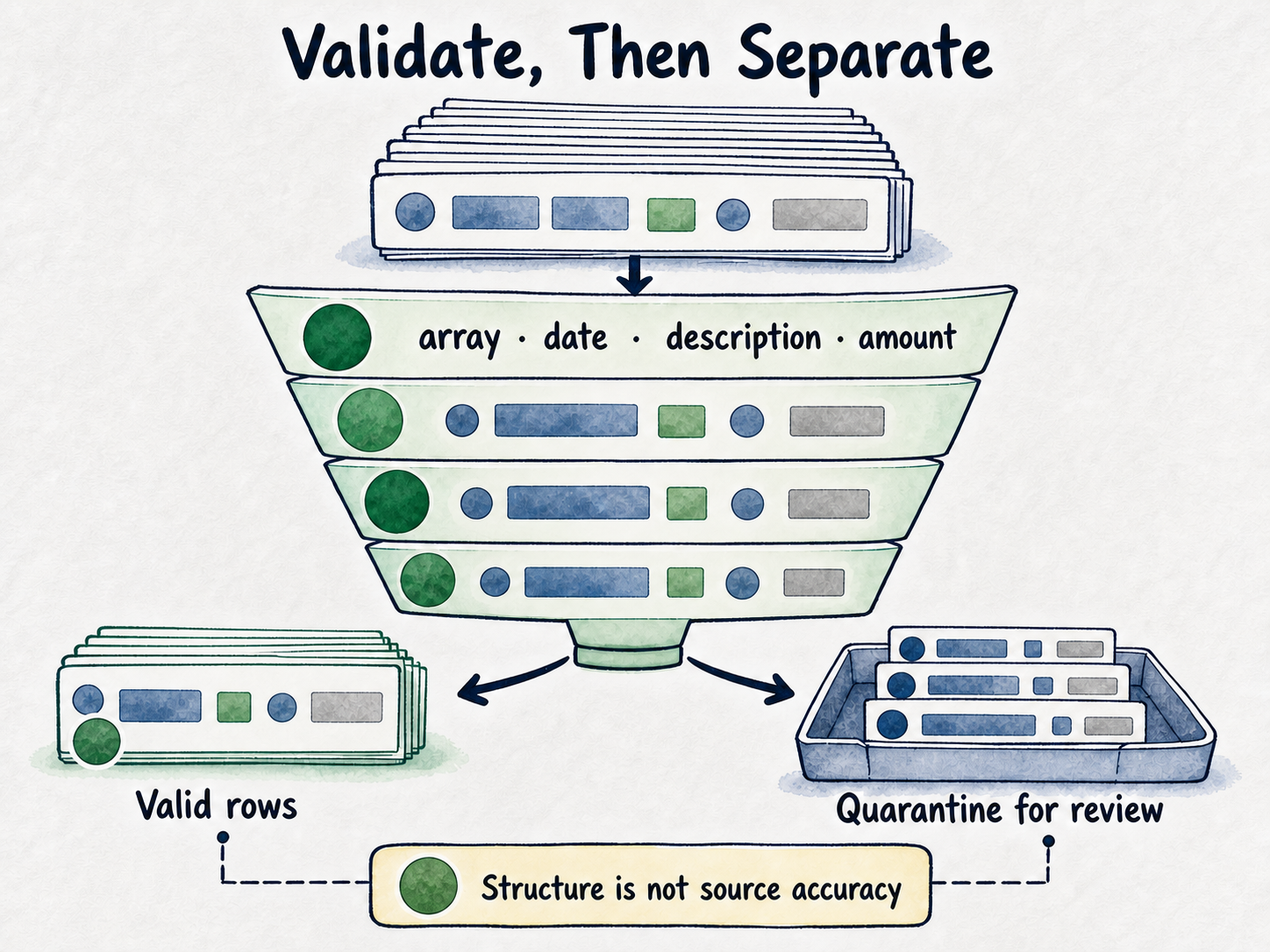
Keep retrieval and validation separate. The retrieval adapter understands the API envelope; the validator accepts only the transaction collection passed to it:
function validateTransactions(value) {
  if (!Array.isArray(value)) {
    return { valid: [], rejected: [{ reason: "transactions-not-an-array" }] };
  }

  const valid = [];
  const rejected = [];

  for (const row of value) {
    const hasDate = row && row.date !== null && row.date !== undefined;
    const hasDescription =
      row && typeof row.description === "string" && row.description.trim() !== "";
    const hasAmount = row && row.amount !== null && row.amount !== undefined;

    if (hasDate && hasDescription && hasAmount) valid.push(row);
    else rejected.push({ row, reason: "missing-required-transaction-field" });
  }

  return { valid, rejected };
}
The checks are deliberately modest. They confirm the presence of date, description, and amount, the transaction fields identified by the converter, without inventing a date format or amount type. Transaction fields
Do not silently coerce a missing amount to zero or an absent description to an empty string. Quarantine rejected rows and route them for review. Passing structural validation does not prove that an extracted value matches the source PDF or is suitable for accounting, tax, legal, or compliance use.
Handle Failures and Expiry
Operational behavior should be explicit enough that an on-call engineer can tell whether to stop, retry, or escalate:
- Malformed or unsupported input: reject it before submission when local checks can identify the problem. If the service rejects it, preserve the safe error category without assuming an undocumented status code or payload.
- Network failure: retry only when the operation is safe and the request outcome is understood. If job creation may have succeeded before the connection failed, reconcile carefully rather than blindly uploading again.
- HTTP 402: stop automatic processing and direct the account owner to review current allowances on the pricing page. Do not loop on an account condition.
- HTTP 429: wait for
retryAfterSeconds, provided it is valid and still fits within the polling deadline. - Failed job: stop polling and expose a controlled failure to the calling application. Avoid placing statement contents in logs or alerts.
- Local timeout: retain the job ID for reconciliation. A timeout is not evidence that the remote job failed.
- Expired result: treat it as unavailable. Resubmit the source only when continued processing is authorized and operationally appropriate.
Structured results, exports, and associated job metadata are available for seven days from creation and are then deleted automatically. Persist required transaction data in your organization’s approved system before that window closes. Result retention details
That seven-day rule does not mean every upload disappears immediately after submission. Files are held temporarily for processing; completed uploads are removed after processing, failed uploads after cleanup, and stale incomplete uploads within seven days. Keep the upload lifecycle separate from result expiry when designing monitoring and user messages. Upload lifecycle
Choose the Right Source of Detail
This guide owns the Node.js control flow: create one job, classify HTTP branches, poll within a bound, validate the returned transaction collection, and persist what the business needs.
Use the API documentation for current endpoint paths, payload fields, response envelopes, and authentication details. Your integration tests should fail visibly when those contracts no longer match your adapters.
Use the data-retention policy for the separate lifecycles of uploads, results, exports, and metadata. Consult the pricing page for current page allowances rather than copying time-sensitive figures into implementation code or documentation.
Accuracy evaluation is a different job. The bank statement extraction API testing guide covers the controlled-fixture and vendor-evaluation work; this implementation guide does not reproduce that framework.
Run the Flow
Create an account, obtain an API token, and load it only in the backend environment. Prepare an authorized synthetic PDF under 25 MB, then confirm the current job, status, and result schemas in the API documentation.
Run the sequence end to end: submit with mode=convert, capture the job ID from HTTP 202, poll within your chosen bound, honor retryAfterSeconds after HTTP 429, stop for HTTP 402 or a failed job, retrieve the completed JSON transaction result, quarantine malformed rows, and persist the required data before expiry.
FAQ
Why can’t I call the API directly from browser JavaScript?
Doing so would expose the bearer token to the browser and potentially to users, extensions, logs, or captured requests. Send the file to a backend you control and let that backend authenticate with the bankstatement.ai REST API. Server-side token guidance
Does HTTP 202 mean the PDF has been converted?
No. It means job creation was accepted and returned a job ID. Processing is asynchronous, so the backend must poll the job until it observes complete or failed before attempting result retrieval.
How long should the polling loop run?
Choose a deadline or attempt limit based on your worker and user-experience requirements. Keep network retries and rate-limit waits inside that same bound. If it expires, record a local timeout and retain the job ID for later reconciliation instead of declaring the remote job failed.
What should happen after HTTP 402 or HTTP 429?
HTTP 402 means the account needs more pages, so automatic retries should stop pending account action. Review current allowances on the pricing page without embedding time-sensitive figures in application logic. HTTP 429 is rate limiting; read retryAfterSeconds, wait accordingly, and retry only if the delay fits within the remaining polling budget.
Why validate JSON if the job completed successfully?
Completion means processing reached its successful terminal state; it does not make every row infallible. Check that the result contains a transaction collection and that retained rows have usable date, description, and amount values. Quarantine malformed rows and apply an appropriate review process before relying on the data.
What happens if I wait longer than seven days?
The structured result, exports, and associated job metadata expire after seven days. Save required data in an approved downstream system during the availability window; after expiry, a new authorized submission may be necessary.